
Although two-step authentication is essential to protect yourself from cyberattacks, there are times when you might not be able to use it anymore.
This could happen, for example, if your phone is stolen or lost. It could also happen that you forget that you have the authenticator installed on your smartphone and sell it.
Don't worry , exchanges have already thought of these scenarios, and recourse is possible. However, the best thing to do is to act before this happens... 🙂
Are you using Google Authenticator on a dozen sites? No luck, you'll have to manually disable this option on all of them . Start by logging into each of them , using two-step authentication.
Protect yourself by disabling your 2FA in advance
Are you using Google Authenticator on a dozen sites? No luck, you'll have to manually disable this option on all of them . Start by logging into each of them , using two-step authentication. Then, you'll need to find the appropriate option depending on the site you're using; generally, you'll need to access your profile first . Here are two examples below for Binance and Bittrex .
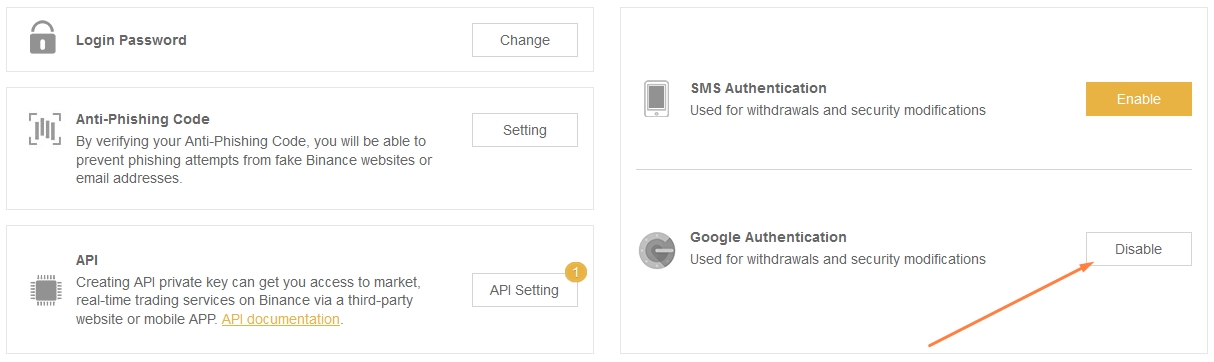 Binance.
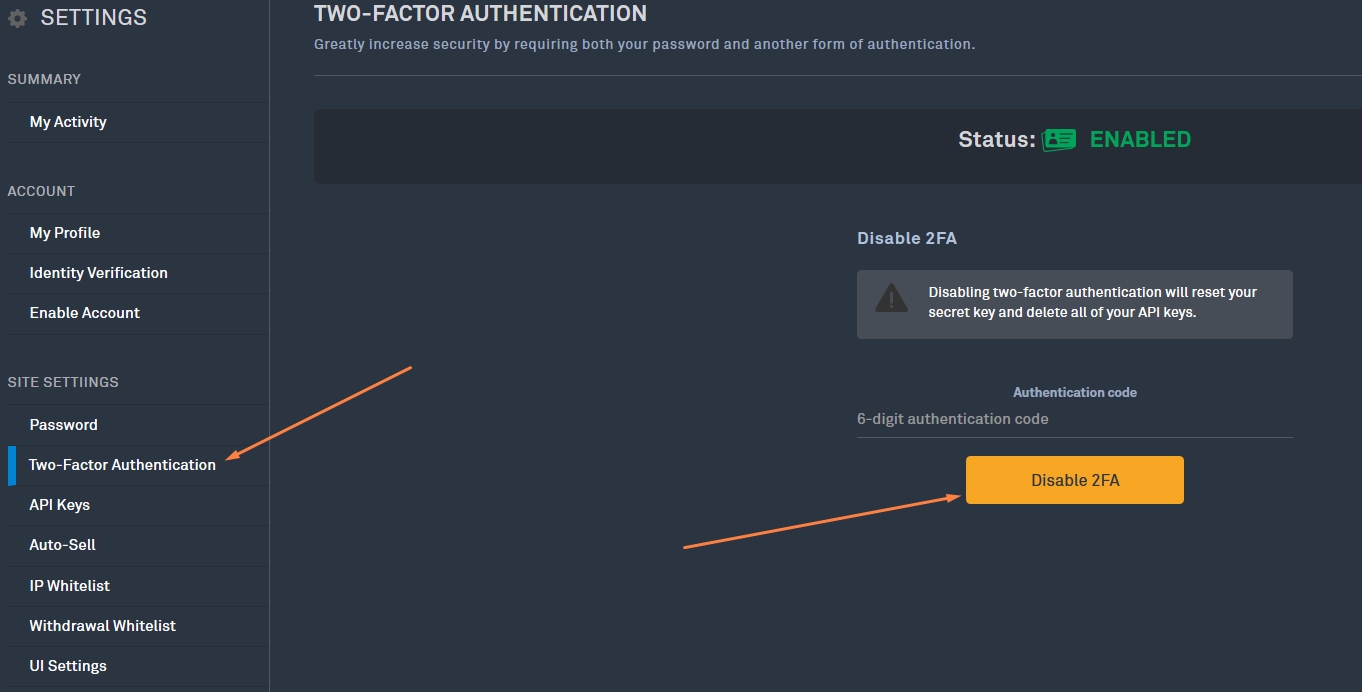
Once your account is no longer secure on the site , you can delete the site from your two-factor authentication app.
Binance. Once your account is no longer secure on the site , you can delete the site from your two-factor authentication app.
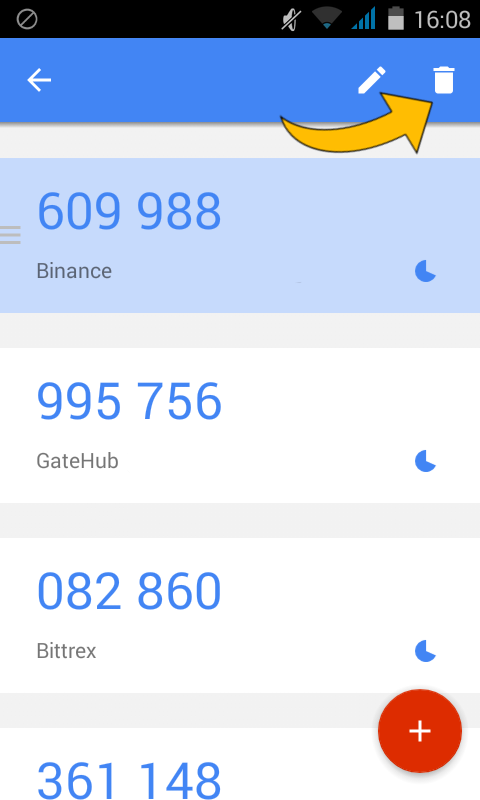
To delete the site on your Android phone , tap and hold the line you want to delete for a few moments , a menu will appear at the top, then click the trash can .
If you are using an iPhone , you will need to click the small pen in the top right corner, then select the line you want to delete and click the trash can.
Find your 2FA recovery key
Have you already enabled two-step authentication on a site, but didn't remember to save the recovery key? There's no way to recover it.The only solution is to remove two-step authentication on the site in question, then re-enable it. You will then be given a new recovery code, which will replace the old key. Remember to write this code down this time :)
If you have your recovery key , you'll need to contact the support team for that site. You'll usually find a link at the bottom of the homepage; if not, Google "support + the site name."
When you no longer have access to your 2FA...
Have you already sold your phone or dropped it in the toilet? Don't lose hope, it's still possible to recover your bitcoins. There are two types of people: those who are cautious and have set aside their recovery key, and the others...If you have your recovery key , you'll need to contact the support team for that site. You'll usually find a link at the bottom of the homepage; if not, Google "support + the site name."
When contacting support, provide the email address associated with your account, your username, and your recovery key. They may ask for additional information.
⚠ Warning: Please NEVER DISCLOSE YOUR PASSWORD , even to official exchange supports.
If you don't have your recovery key, follow the same steps as above. However, support may ask for specific information, so contact them as soon as possible.
⚠ Warning: Please NEVER DISCLOSE YOUR PASSWORD , even to official exchange supports.
If you don't have your recovery key, follow the same steps as above. However, support may ask for specific information, so contact them as soon as possible.
Additionally, your account will be restored to you after a certain period of time , such as one week.