
Bitfinex was founded in 2014 by iFinex Inc. The platform is a benchmark for bitcoin trading . It ranks first (in terms of volume) among the world's top exchanges for BTC transactions and second overall for all cryptocurrencies (source: CoinMarketCap.com ).
Bitfinex was originally a cryptocurrency-to-cryptocurrency exchange. However, it has recently become possible to deposit fiat (euros, dollars, etc.) on their platform. Account verification is not required to deposit and withdraw cryptocurrencies. However, it is required if you wish to deposit or withdraw fiat.
This platform is, in my opinion, one of the most ergonomic , pleasant and easy to use. The latter includes numerous aids in the form of explanatory bubbles . It also offers a range of different orders, we address this theme in the section How to use the Bitfinex exchange? We can also note that the exchange is very fluid and that it uses a good API allowing it to manage numerous purchase and sale orders per second.
Fees on Bitfinex depend on the volume of your buy and sell orders executed over the last 30 days as well as the type of orders you place. If you place a limit buy or limit sell order that is not executed immediately (because it is not at the market price), the fees will be lower than if you had placed a buy or sell order at the market price that would have been executed immediately. For example, if the volume of your orders over the last 30 days is less than $500,000 and you place a limit buy , you will pay a 0.1% fee when your order is executed. On the other hand, if the volume of your orders over the last 30 days is less than $500,000 and you place an order at the market price, it will be executed immediately and you will pay a 0.2% fee. To learn more about the fees charged by Bitfinex, I invite you to read this article: Bitfinex - Fees
There is, however, one shadow over the picture : Bitfinex's strange relationship with the creators of Tether (USDT) . Alarmist articles and user comments on the subject have been multiplying lately.
How To Register on the Bitfinex platform
To do this, nothing could be simpler, go to bitfinex.com then click on Sign up .
You will then be prompted to fill in the fields below:
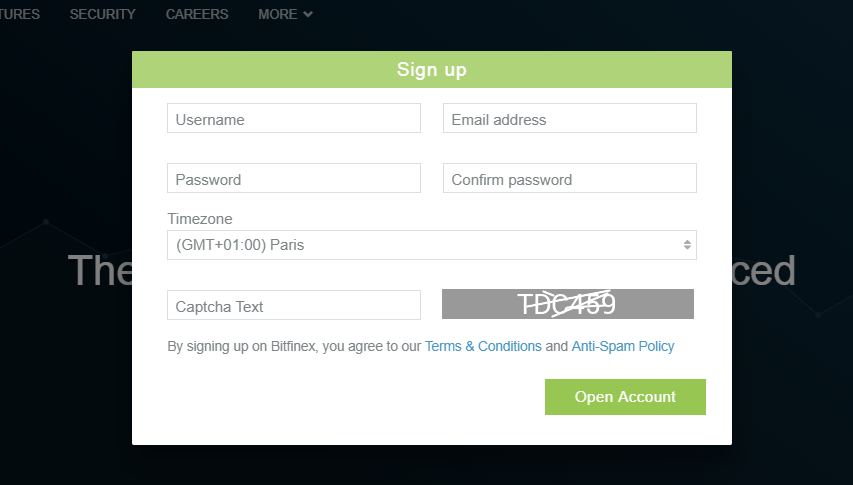
Once this step has been validated, you will receive an email which will allow you to validate your account.
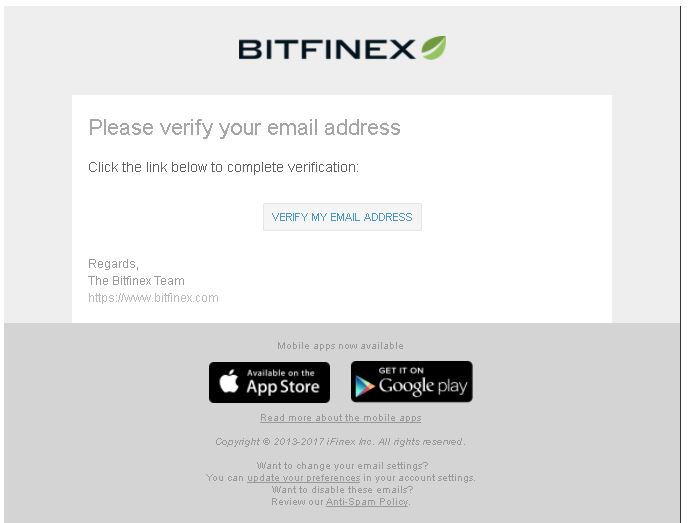
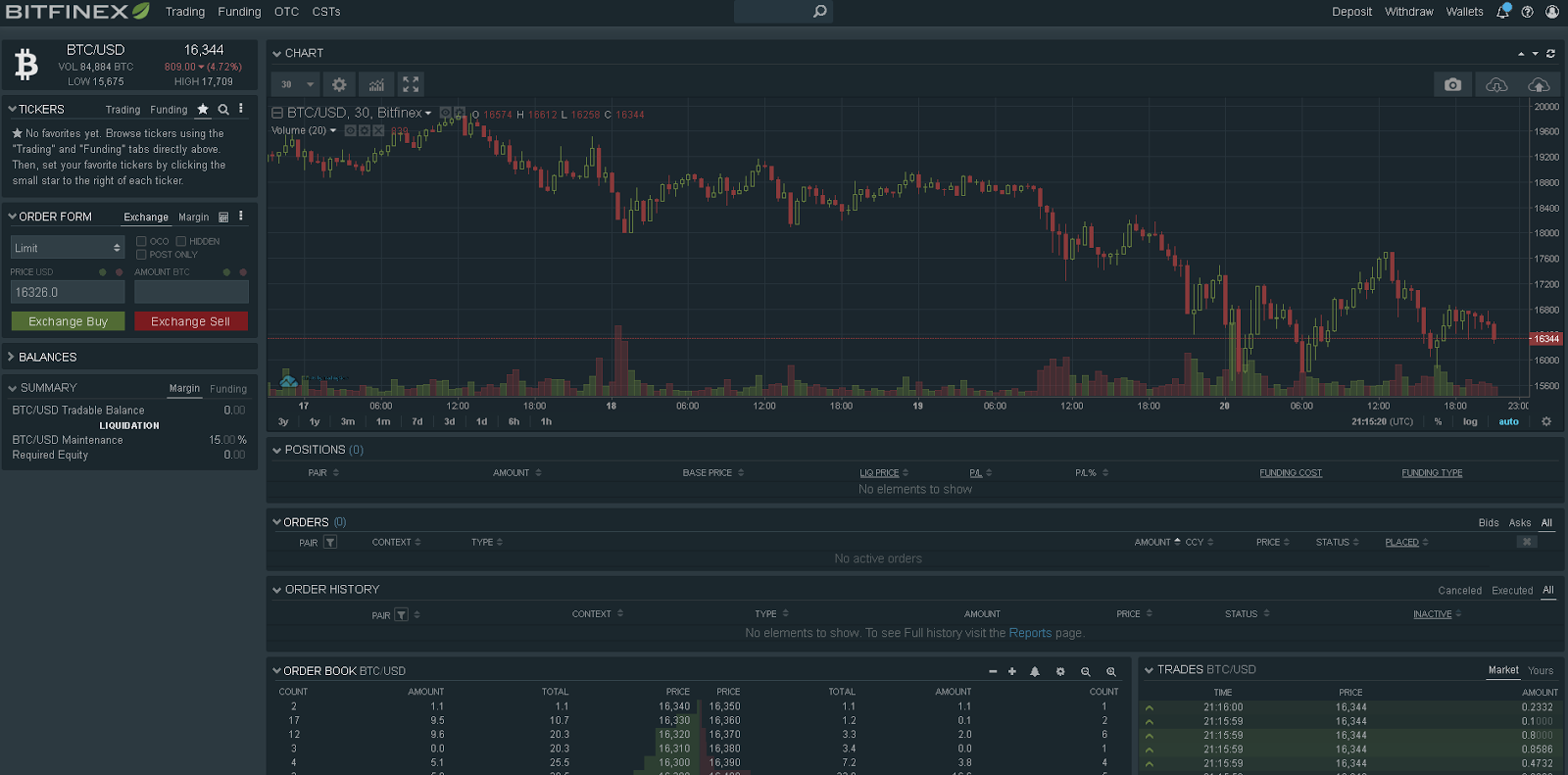
Congratulations, your account is validated! To log in, click Log In and enter your username and password. Once logged in to the platform, you should see the window below:
The first thing to do, before you start trading, is to secure your account by activating two-factor authentication .
Secure your Bitfinex account with two-factor authentication (2FA)
What is two-factor authentication (2FA)? The principle of two-factor authentication is simple: instead of logging into your account using just your password, login is based on two factors: the password first, and then a unique , temporary code generated by an app on your smartphone. By relying on something you know (the password) plus something you have (your smartphone), you drastically reduce the possibility of your account being stolen , since if someone were to get your credentials, they would also need your smartphone to log in to your account. Google Authenticator is the most widely used mobile app for managing codes. It's available on iOS and Android and works the same way on both platforms. Start by installing the Google Authenticator app on your smartphone.
Google Authenticator app logo


Got the app installed on your smartphone? Great, we can move on to the next step 🙂 Go back to Bitfinex and click the man icon in the top right menu, then click Security . You should be redirected to the page below:
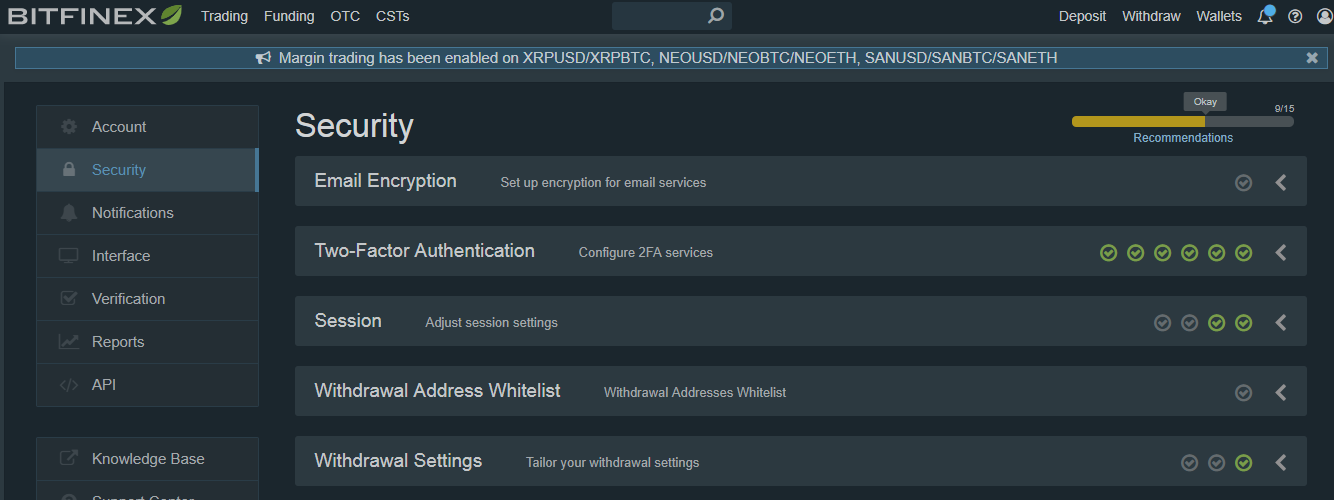
To enable Two-Factor Authentication, click on the section with the same name.
Several options are available to you; we recommend using Google Authenticator .
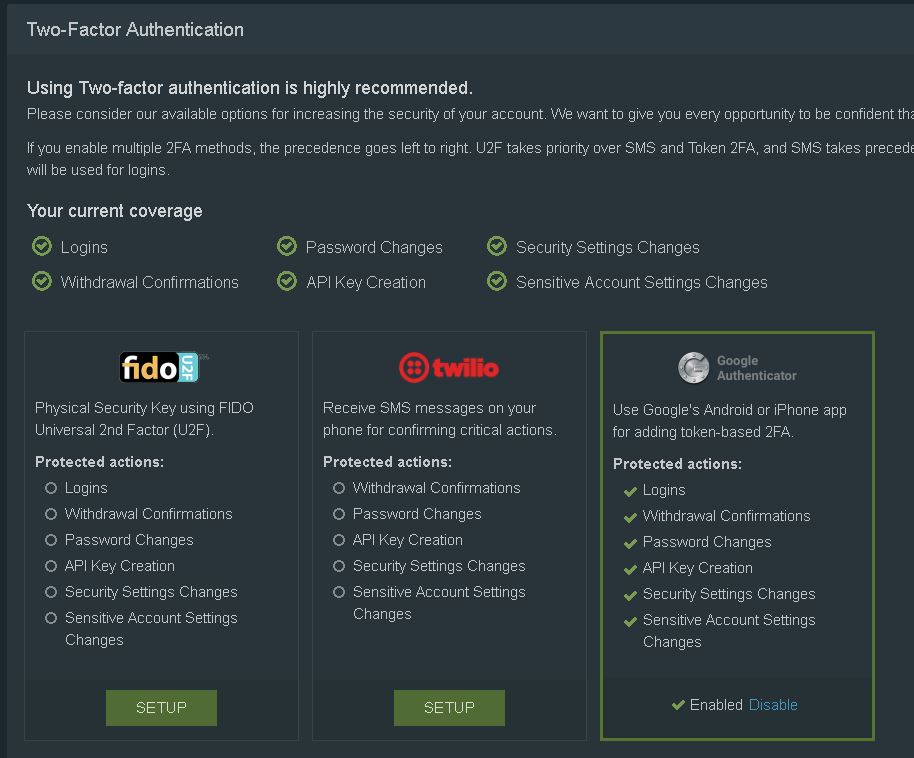
You can now open your Google Authenticator app and click the small ➕ to scan the Bitfinex QR code . There you go, your 2FA (two-factor authentication) code will now appear on your app. You will need to enter the 2FA code displayed on Google Authenticator on Bitfinex to complete the activation.
Congratulations ? Your account is now secure with two-factor authentication. You will be prompted for the code generated by the app each time you attempt to log in to your Bitfinex account.
Verify your Bitfinex account
There is no verification required if you want to deposit and withdraw cryptocurrencies . However, if you want to deposit or withdraw fiat currencies (euros, dollars, etc.), you will need to verify your account.To verify your account, click the man icon in the top right menu and then click Verification . You should arrive at the following page:
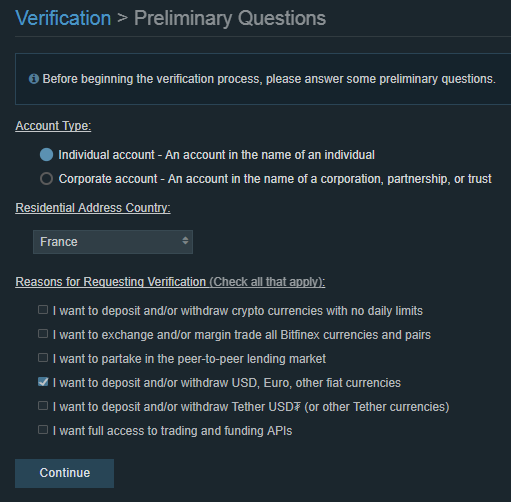
Select the type of account you want to verify: either an individual account or a corporate account. Indicate your country of residence and the reason why you want a verified account. As you can see in the screenshot above, I indicated that I wanted a verified account to be able to deposit and withdraw fiat on Bitfinex.
Below is the list of things required to validate a personal account on Bitfinex:1.Be at least 18 years old
2.Enter your telephone number , email address and postal address
3.Provide two identity documents --> you have the choice between: passport, national identity card, driver's license, residence card, or any other government document with a photo
4.Bank Identity Statement (RIB) --> your first deposit on Bitfinex must come from this account
5.Proof of address less than 3 months old (gas, water, electricity bill, etc.)
Documents must be uploaded in the following formats: pdf, jpeg, png, txt, msword
Making a Deposit and Withdrawal on Bitfinex
For fiat , deposits are subject to a fee corresponding to 0.1% of the deposited amount. For withdrawals, these fees are respectively 0.1% and 1% for a standard withdrawal and a 24-hour withdrawal .For cryptocurrencies, here is a link showing the fees for depositing and withdrawing each cryptocurrency: Bitfinex - Fees
Additional fees will apply if you make a deposit below $1,000. If you deposit Ethereum and the dollar equivalent is less than $1,000, then you will be charged a fee.
Here is a table summarizing Bitfinex fees for deposits under $1,000:
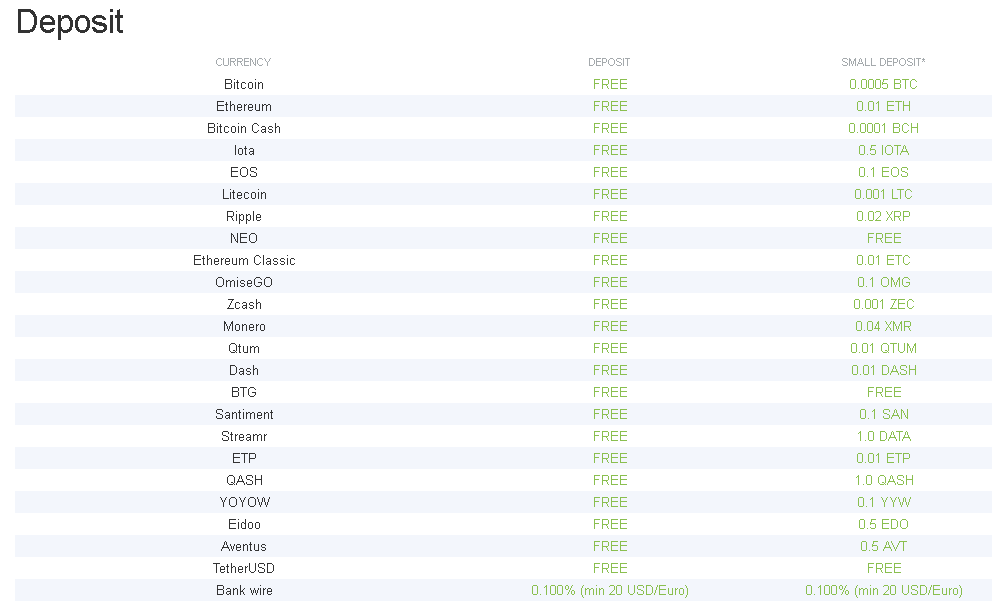
Before depositing fiat or crypto, you will need to confirm that you understand that deposits under $1,000 will incur additional fees.
It is possible to deposit cryptocurrencies to Bitfinex from Coinbase , Kraken and many other platforms.
Depositing Cryptocurrencies on Bitfinex
To deposit crypto on Bitfinex, you will need to click on Deposit in the top right menu.
You will then be redirected to a page where you can see all your wallets (and therefore all the cryptocurrencies supported by Bitfinex).
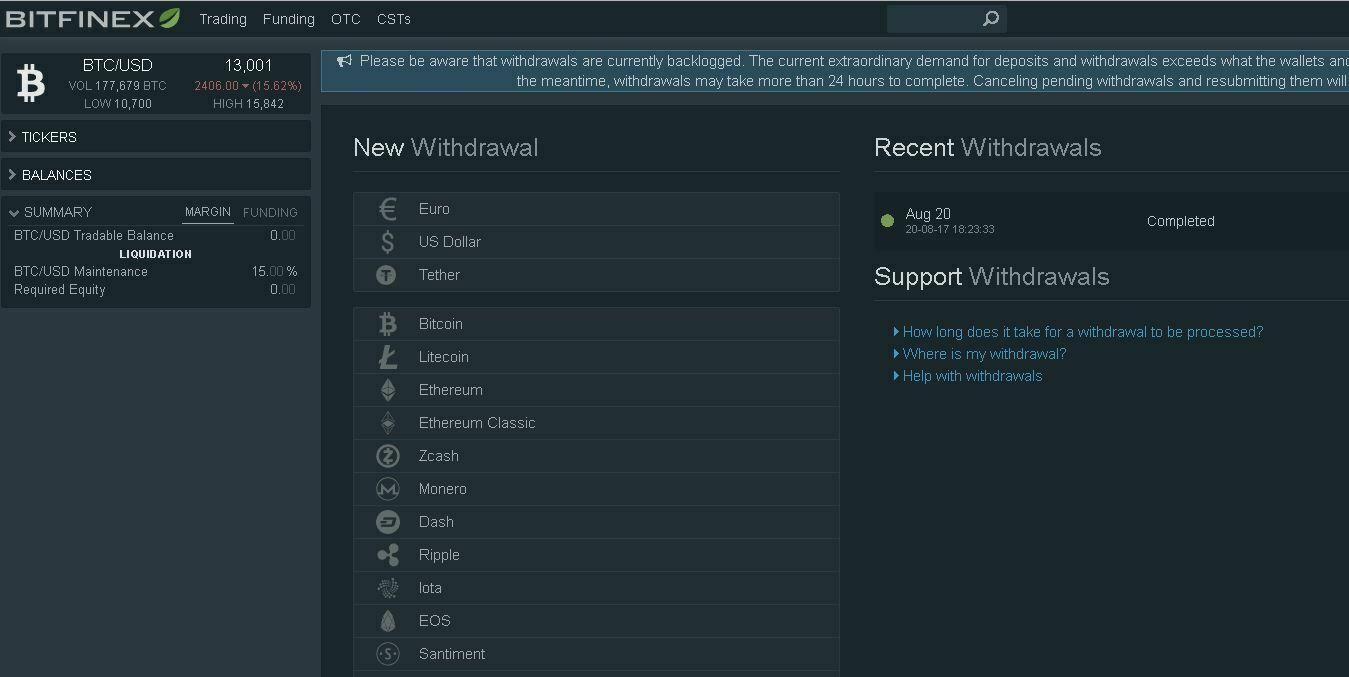
Conversely, on the Withdraw page you will find all the cryptocurrencies that you can withdraw from Bitfinex.
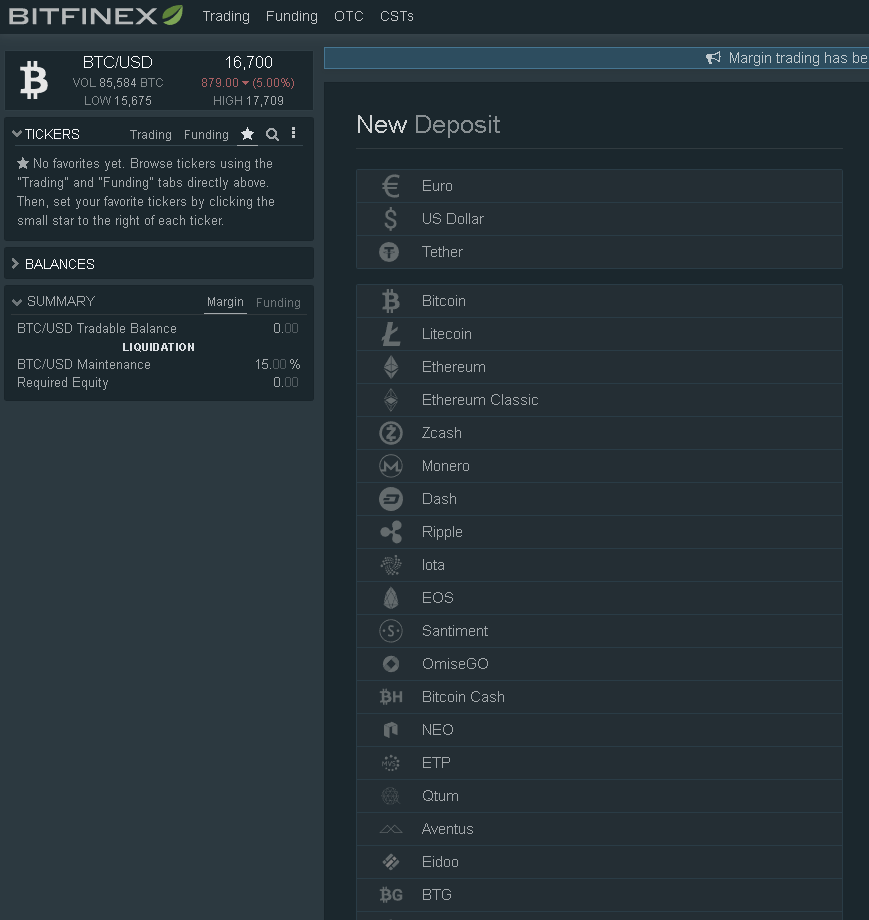
In order to deposit, let's say, Ethereum you need to click on the Ethereum icon.

Once this is done you will see this page appear:
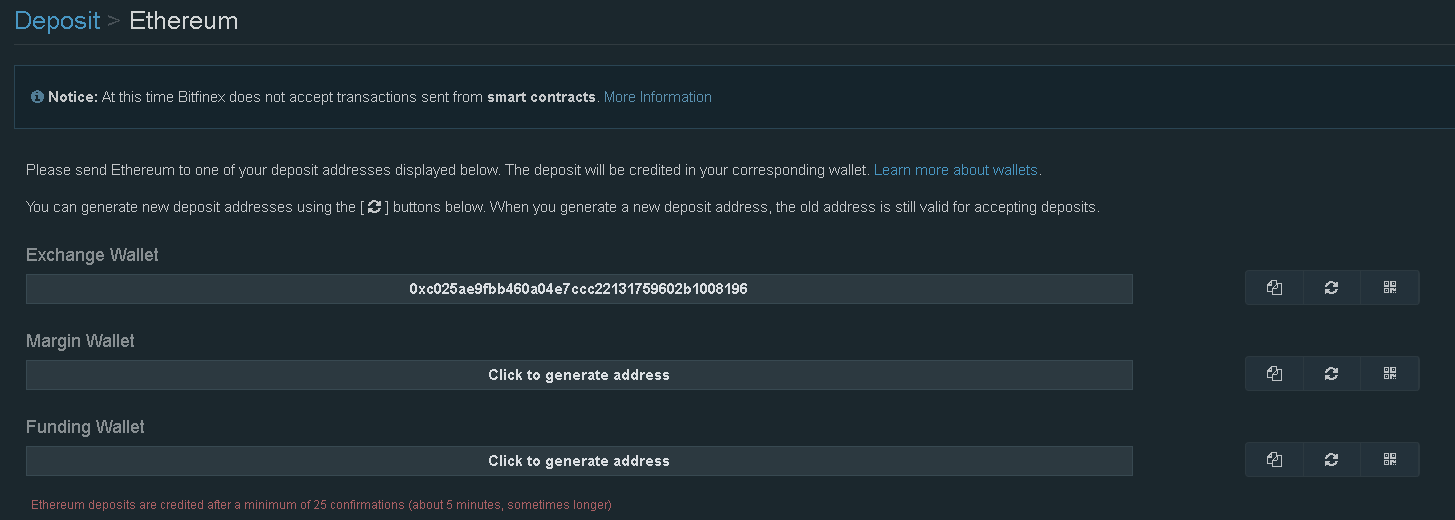
In the example below, to generate my Exchange Wallet address I clicked on “Click to generate address” .
The Exchange Wallet is the wallet used for trading.
The Margin Wallet is the wallet used to create positions (long or short).
The Funding Wallet is the wallet used to provide funds to other traders so they can place positions. An interest rate is set between the lender and the borrower.
To transfer between different wallets you will need to go to the Wallets tab at the top right and then make a transfer between your different wallets.

Let's start again, to deposit Ethereum on Bitfinex you will need to indicate the address associated with the Ethereum wallet to which you wish to transfer your Ethers .
In our example: 0xc025ae9fbb460a04e7ccc22131759602b1008196
Depositing cryptocurrency to the wrong address (depositing BCH to a BTC address) results in a $150 “error” fee .
Deposit fiat (euros, dollars, etc.) on Bitfinex
To deposit fiat ( Euros , Dollars ), you must always go to the Deposit tab and click on the Euros or Dollars symbol.
Once this is done you will need to follow the instructions.
Before you can deposit fiat , you'll need to verify your account. This isn't necessary for depositing cryptocurrencies.
Withdraw Cryptocurrencies from Bitfinex
To withdraw cryptocurrencies from Bitfinex, simply go to the Withdraw section at the top right. After clicking Withdraw you need to click on the cryptocurrency you want to withdraw. In my case, IOTA .
You should see the following page appear. In the Address section , you must select the address where you will store your cryptocurrency (in my case, an IOTA address).
In the Send Amount section , you will choose the amount you wish to withdraw.
In the From section , you will choose which wallet your funds are withdrawn from.
The Tx Fee section tells you what the transaction fees are. In my case, 0.5 MIOTA.
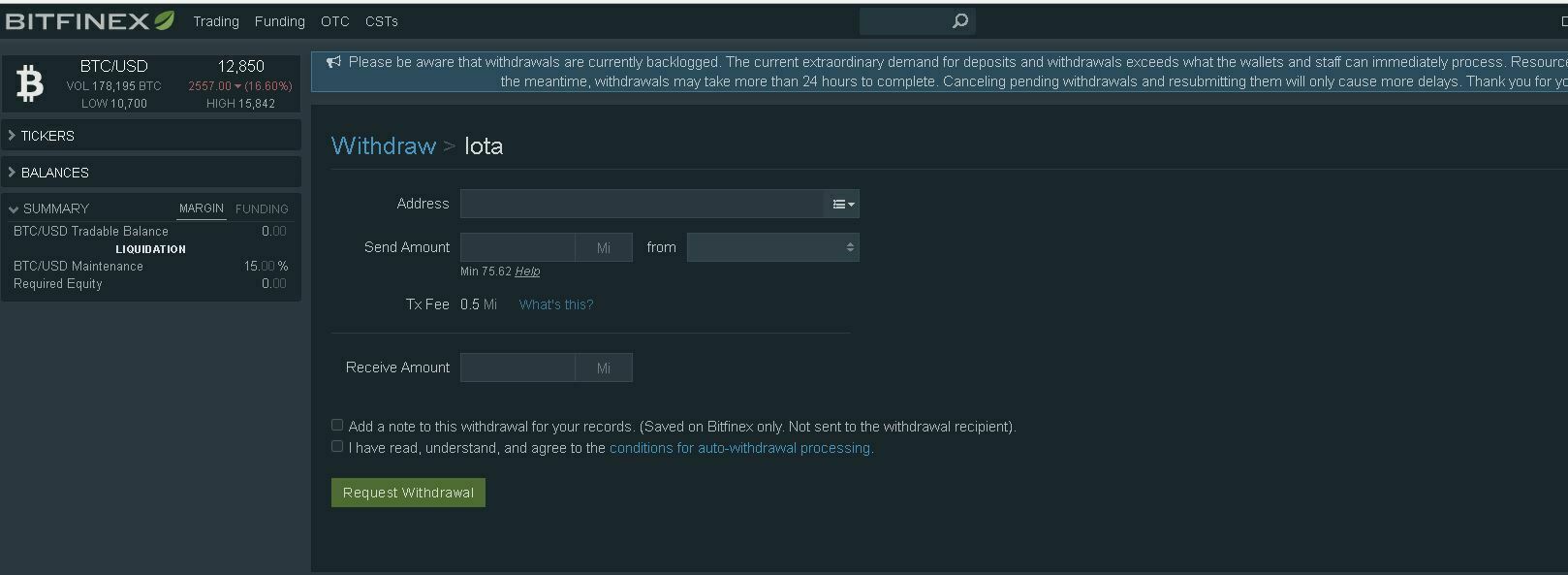
Once this is completed, click on Request a Withdrawal .
After clicking on Withdraw , you will have to select your quote, either Euros or Dollars.
Then follow the instructions to request a transfer to your account.
You should arrive at the page used to trade Bitcoin (BTC) for dollars (USD) .
The right-hand side allows you to place these sell or buy orders for the BTC/USD pair . It also provides a brief summary of the price value and its evolution over the last 24 hours .
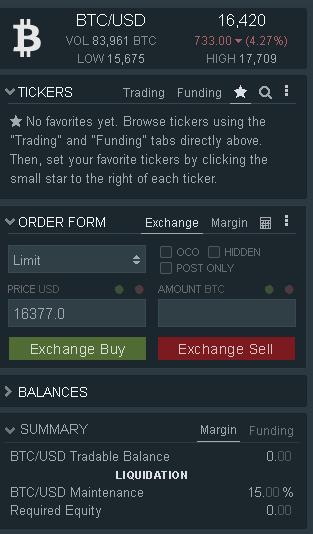
Different options are available to you:
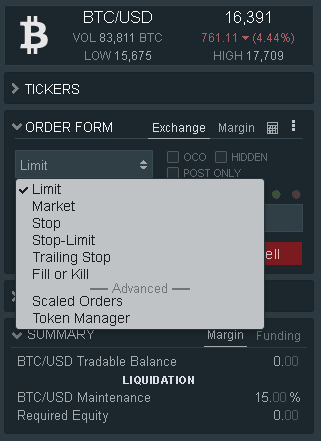
- Limit : Allows the trader to specify a price at which they wish to buy or sell. Example: If the current market price is 250 and I want to buy at a lower price, then I would place a buy order at 249. If the market reaches 249 and a seller's sell order matches my offer, my order will be executed at 249.
- Market : type of order that executes immediately at the current price.
- Stop : This order is triggered when the market moves down (or up) to the trigger price.
Example: If the current market price is 250, the buyer may want to sell if the price reaches 245. A stop sell at 245 would be used in this case.
- Stop-Limit : This order is executed when the price is within a specific price range and not as a market order.
Example: If a trader wants to buy once the market price reaches 250, but does not want to pay more than 252, then a stop price of 250 and a limit price of 252 will be specified. If the market price reaches 250, the order is triggered and will match the best available bids up to 252. If the price rises to 252.01 or higher, the order may be partially executed due to the limit price.
- Fill or Kill : the order must be carried out immediately or it is canceled
- Scaled Order : The algorithm automatically creates multiple limit orders within a price range determined by the user. This tool also allows you to control the diversity and distribution of orders within the price range. Here is an explanatory video from Bitfinex .
In the middle of the page is the chart , in my case, of the BTC/USD pair.
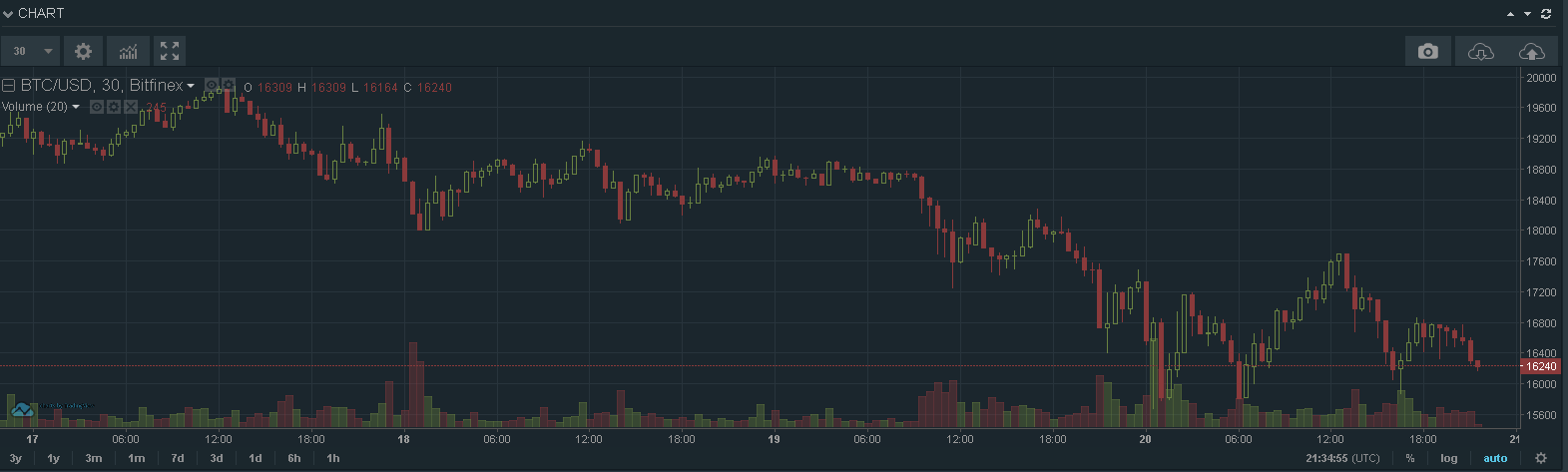
At the top left you can change the time range , modify the parameters and add indicators (mainly curves) like MACD ....
At the top right you can take a snapshot at a given time “T”.
Below the graph, these 3 windows appear:

Positions : a summary of your BTC/USD positions
Orders : a summary of your current orders
Order history : a summary of your past orders
At the very bottom you will find the order book (on the left) and the history of transactions carried out (on the right).
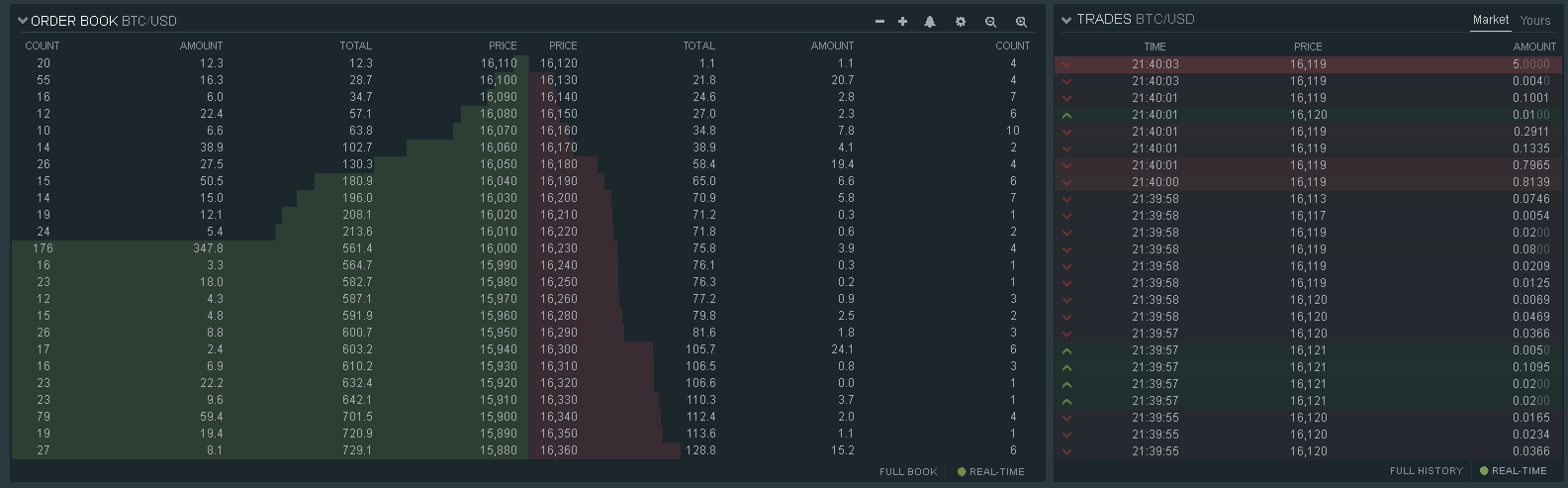
In green : purchase orders
In red : sale orders
If you are interested in a tutorial on how to place longs and shorts on Bitfinex, let me know.
Withdraw Fiat from Bitfinex
The principle is the same as for withdrawing cryptocurrencies .After clicking on Withdraw , you will have to select your quote, either Euros or Dollars.
Then follow the instructions to request a transfer to your account.
Using the Bitfinex exchange
Let's start with the first page you arrive on when you log in, this one: You should arrive at the page used to trade Bitcoin (BTC) for dollars (USD) .
The right-hand side allows you to place these sell or buy orders for the BTC/USD pair . It also provides a brief summary of the price value and its evolution over the last 24 hours .
Different options are available to you:
- Limit : Allows the trader to specify a price at which they wish to buy or sell. Example: If the current market price is 250 and I want to buy at a lower price, then I would place a buy order at 249. If the market reaches 249 and a seller's sell order matches my offer, my order will be executed at 249.
- Market : type of order that executes immediately at the current price.
- Stop : This order is triggered when the market moves down (or up) to the trigger price.
Example: If the current market price is 250, the buyer may want to sell if the price reaches 245. A stop sell at 245 would be used in this case.
- Stop-Limit : This order is executed when the price is within a specific price range and not as a market order.
Example: If a trader wants to buy once the market price reaches 250, but does not want to pay more than 252, then a stop price of 250 and a limit price of 252 will be specified. If the market price reaches 250, the order is triggered and will match the best available bids up to 252. If the price rises to 252.01 or higher, the order may be partially executed due to the limit price.
- Fill or Kill : the order must be carried out immediately or it is canceled
- Scaled Order : The algorithm automatically creates multiple limit orders within a price range determined by the user. This tool also allows you to control the diversity and distribution of orders within the price range. Here is an explanatory video from Bitfinex .
In the middle of the page is the chart , in my case, of the BTC/USD pair.
At the top left you can change the time range , modify the parameters and add indicators (mainly curves) like MACD ....
At the top right you can take a snapshot at a given time “T”.
Below the graph, these 3 windows appear:
Positions : a summary of your BTC/USD positions
Orders : a summary of your current orders
Order history : a summary of your past orders
At the very bottom you will find the order book (on the left) and the history of transactions carried out (on the right).
In green : purchase orders
In red : sale orders
If you are interested in a tutorial on how to place longs and shorts on Bitfinex, let me know.