
The release of the most popular cryptocurrency storage service in 2023 took place 7 years ago - in 2016. The authors were the developers of ConsenSys AG.
During this time, the novice startup has turned into a large fintech laboratory. Its value has increased 38 times in 3 years - from $ 121 million to $ 3.2 billion.
Initially, the wallet helped to receive and send assets in the Ethereum network, in particular ETH coins and ERC-20 tokens. Over time, the service options expanded. It became possible to add networks technologically close to the Ethereum blockchain.
Initially, the wallet helped to receive and send assets in the Ethereum network, in particular ETH coins and ERC-20 tokens. Over time, the service options expanded. It became possible to add networks technologically close to the Ethereum blockchain.
Now the service has become a multi-wallet for assets in 37 chains compatible with the Ethereum Virtual Machine (EVM).
The total number of available cryptocurrencies is difficult to determine; dozens of projects and their tokens are released daily.
Given the diversity, it is important to understand the specifics of the wallet's operation and use, namely how the basic procedures are performed:
Given the diversity, it is important to understand the specifics of the wallet's operation and use, namely how the basic procedures are performed:
- Adding popular tokens
- Manual entry of details of new cryptocurrencies
- Switching between networks
Adding a token
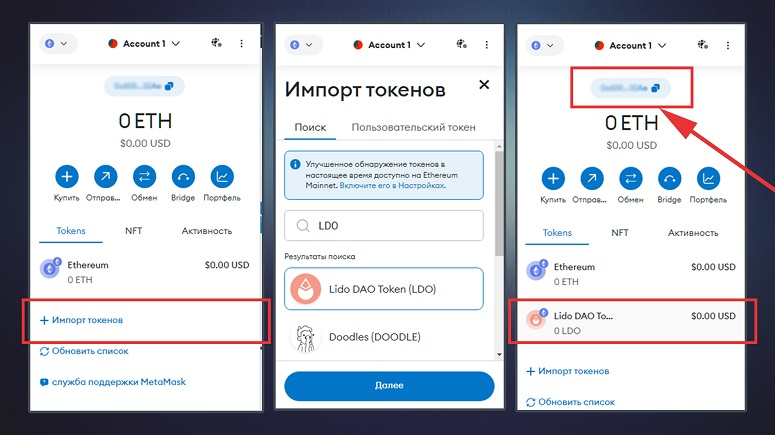
When you first install the wallet, the interface looks laconic. It only displays the Ethereum and Linea Mainnet blockchains.- Go to wallet.
- Click on the button "+ Import tokens"
- In the “Token Search” field, you must enter the name of the cryptocurrency or its ticker - for example, Lido DAO Token or LDO.
- Select the desired option from the suggested results. After that, the button below will be activated.
- Click Next and then click Import Tokens.
You can top up your Binance exchange balance using ERC-20 tokens. However, the main disadvantage of Ethereum Mainnet is the high cost of the commission. It is paid in ETH and at the rate in October 2023 is about $390.
You can choose a blockchain with lower transaction fees. Binance offers transfers on the BNB Smart Chain (BSC) network, as well as native cryptocurrencies BUSD and BNB.
Adding a BEP-20 Network
BSC is an independent blockchain. Similar to Ethereum, developers can also create tokens in it. They are assigned the BEP-20 standard. In accordance with it, native cryptocurrencies BUSD and BNB were issued.To perform transactions with assets, you need to add the BSC network to the MetaMask wallet.
This is done manually. Step by step instructions
This is done manually. Step by step instructions
- Launch the MetaMask application or browser extension.
- In the upper left corner, click on the network logo.
- Click on the "Add network" button. After that, the web page with settings will load in the browser.
- In the "Search" line, you must specify the network name or select an option from those offered in the list below.
- Next, you will need to click on the “Add” button and then “Approve”.
- Finally, click on “Switch to BNB Chain”.
How to Transfer Cryptocurrency from MetaMask to Binance
BNB Smart Chain (BSC) is part of the Binance ecosystem. Therefore, when transferring cryptocurrencies to this exchange, it is better to choose this blockchain.In addition to inexpensive transactions, it has another advantage - high speed. Transfers take less than a minute. Before sending assets from MetaMask to Binance, you need to copy the recipient's wallet address:
- Log in to the exchange.
- At the top, click on the “Top up” button.
- Click on the line “Deposit cryptocurrencies”.
- Mark the coin - for example, BNB.
- Specify the BNB Smart Chain (BEP-20) network.
- Click on the "Get address" button.
Step-by-step instructions for translation
In the app and browser extension, sending cryptocurrencies is done according to the same scheme. Step-by-step instructions for withdrawing money from MetaMask to Binance:- Launch the application or browser extension.
- Expand the list of networks in the left corner and select BNB Smart Chain (BEP-20).
- On the main page, click on the BNB cryptocurrency.
- Next you will need to click on the “Submit” button.
- In the field "Search, open address (0x) or ENS" insert the details of the recipient wallet. In the mobile application, you can use the QR code scanner (icon on the right).
- In the "Amount" column, specify the amount of cryptocurrency to be transferred. The commission amount is automatically taken into account when forming the transaction.
- Click on the "Next" button. Using the "Market" menu, you can increase the fee to make the transaction faster.
- To complete, you must click on the "Confirm" button.
MetaMask Tips for Beginners
It is important to remember the security rules when working with crypto assets. First of all, you should securely save the seed phrase.This is a combination of 12 words that works as a recovery key. The seed can also be used to open the storage on another device or even loaded into the interface of a third-party blockchain wallet.
For example, you can import an address into Trust Wallet using the seed phrase.
This is due to the vulnerability of browsers. Most cyber attacks against MetaMask were aimed at weak points of the Chromium system. This is the name of the software foundation that underlies most popular browsers - Chrome, Yandex, Edge, Opera and others.
This is due to the vulnerability of browsers. Most cyber attacks against MetaMask were aimed at weak points of the Chromium system. This is the name of the software foundation that underlies most popular browsers - Chrome, Yandex, Edge, Opera and others.
Therefore, it is not recommended to store large volumes of crypto deposits on extension wallets.